FractalWave Navigator — Automatic Multi-Level Wave Analysis
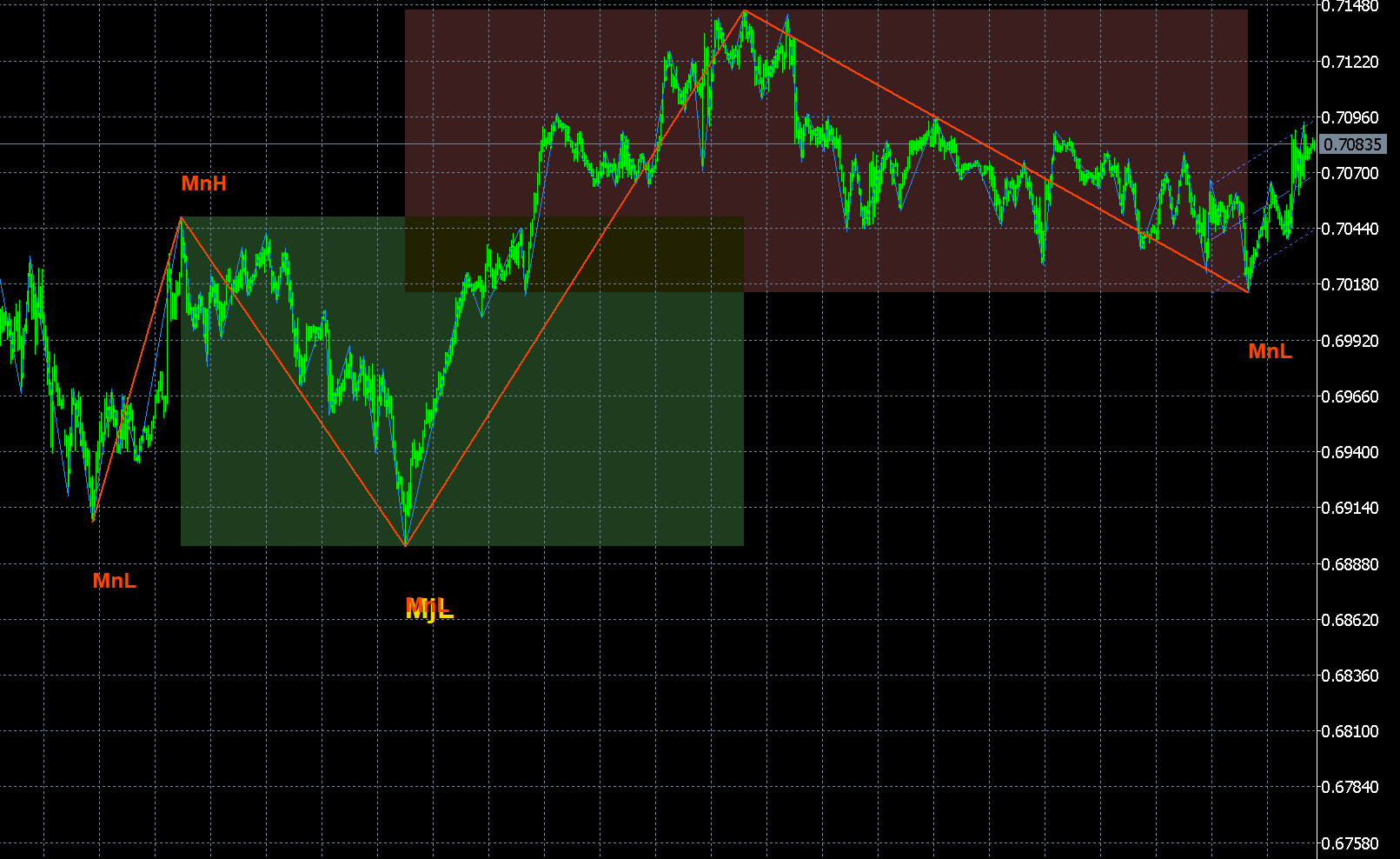
FractalWave Navigator — Automatic Multi-Level Wave Analysis
Decode Market Structure Instantly. Trade Waves with Precision.
FractalWave Navigator is a professional automatic wave analysis indicator that builds three hierarchical wave levels directly on your chart — eliminating subjective wave counting and giving you a clear, standardized view of market structure.
Unlike manual wave analysis where every trader draws differently, this indicator provides quantitative, objective wave definitions — consistent across all users, all instruments, and all timeframes.
How It Works
The indicator uses a three-stage algorithmic pipeline:
- Micro Waves (Level 1) — Precision swing-point detection identifies basic turning points, filtering out noise below a configurable threshold
- Minor Waves (Level 2) — Micro waves are merged into intermediate structures based on swing ratio and minimum leg count
- Major Waves (Level 3) — Minor waves are merged further to reveal the dominant trend direction
Each level is drawn as a color-coded ZigZag with different line thickness, so you can instantly distinguish wave hierarchies at a glance.
Key Features
Three-Level Wave Hierarchy
- Micro Waves (thin blue) — Fast swing structure for scalping and short-term momentum analysis
- Minor Waves (medium orange) — Intermediate segments perfect for swing trading setups
- Major Waves (thick gold) — Primary trend direction for position trading and top-down analysis
Linear Regression Channel
- Automatically calculated dynamic channel on recent price action
- Color-coded by trend direction: blue = bullish, red = bearish
- Upper and lower bands based on configurable standard deviation
Fibonacci Retracement Levels
- Seven levels plotted automatically on the last Major wave swing: 0%, 23.6%, 38.2%, 50%, 61.8%, 78.6%, 100%
- Each level shows exact price value
- Identify high-probability reversal zones without drawing a single line
Oscillation Zone Detection
- Highlights consolidation areas where wave boundaries overlap
- Green zones = bullish bias | Red zones = bearish bias
- Marks potential accumulation/distribution and breakout areas
Real-Time Info Dashboard
- Current trend direction (Bullish / Bearish)
- Daily range and ATR(14)
- Current spread
- Wave count across all three levels
- Last Major swing size in points
- Symbol, timeframe, update time
Alert System
- On-screen popup alerts
- Sound notifications
- Push notifications to mobile
- Email alerts
- Triggered on Major and/or Minor wave turning points
Best Instruments
FractalWave Navigator works on any instrument and timeframe, but trending markets produce the clearest wave structures:
- Gold (XAUUSD) — Excellent wave clarity
- Crude Oil (WTI/Brent) — Strong trending behavior
- GBP pairs — High volatility, clean waves
- Bitcoin / Crypto — Pronounced trend cycles
- Indices (US30, NAS100, SPX500) — Clear major structures
Trading Applications
- Trend following — Major waves define direction, Minor waves time your entries
- Swing trading — Enter on Minor wave pullbacks within the Major trend
- Scalping — Use Micro waves on M1/M5 with Minor waves as trend filter
- Mean reversion — Oscillation zones + Fibonacci levels pinpoint reversal areas
- Risk management — Wave structure provides natural stop-loss and take-profit levels
Input Parameters
| Parameter | Default | Description |
|---|---|---|
| Micro Depth | 5 | Lookback depth for swing detection |
| Micro Min Size | 8 pts | Minimum swing size to qualify |
| Minor Min Ratio | 2.0 | Must be 2x average Micro swing |
| Minor Min Legs | 2 | Minimum Micro legs required |
| Major Min Ratio | 2.0 | Must be 2x average Minor swing |
| Major Min Legs | 2 | Minimum Minor legs required |
| Channel Period | 60 | Regression lookback (bars) |
| Channel Width | 2.0 | Std deviation multiplier |
| Max Bars | 800 | Max bars to calculate (0 = all) |
All visual elements can be toggled on/off independently. All colors are fully customizable.
Specifications
| MT4 | MT5 | |
|---|---|---|
| Platform | MetaTrader 4 | MetaTrader 5 |
| Timeframes | M1–MN | All including M2, M3, H2, H6, H8, H12 |
| Instruments | All | All |
| Chart Window | Main | Main |
| Buffers | 6 | 6 |
| CPU Impact | Low | Low |
How to Install
- Download the
.mq4or.mq5file - Open your MetaTrader terminal
- Go to File → Open Data Folder
- Copy the file to
MQL4/Indicators/orMQL5/Indicators/ - Restart the terminal or right-click Navigator → Refresh
- Drag FractalWave Navigator onto any chart
- Adjust parameters and click OK
FAQ
Does the indicator repaint? The current forming wave may adjust as new bars arrive — this is normal for real-time wave analysis. Completed waves (confirmed by a subsequent opposite swing) do not repaint.
How is this different from standard ZigZag? Standard ZigZag shows only one level of swings. FractalWave Navigator builds three hierarchical levels where each higher level is algorithmically derived from the lower one, plus adds regression channels, Fibonacci levels, oscillation zones, and a full information dashboard.
Can I use it for scalping? Yes. Enable only Micro waves on M1/M5 with Minor waves as a trend filter. The three-level hierarchy is designed for multi-timeframe confluence.
What settings should I start with? The default parameters work well for most Forex pairs on H1. For Gold or volatile instruments, try increasing Micro Min Size to 12–15. For lower timeframes (M1–M5), reduce Micro Depth to 3.
© 2026 IndicoLab — https://indicolab.com