FVG Precision Matrix Pro
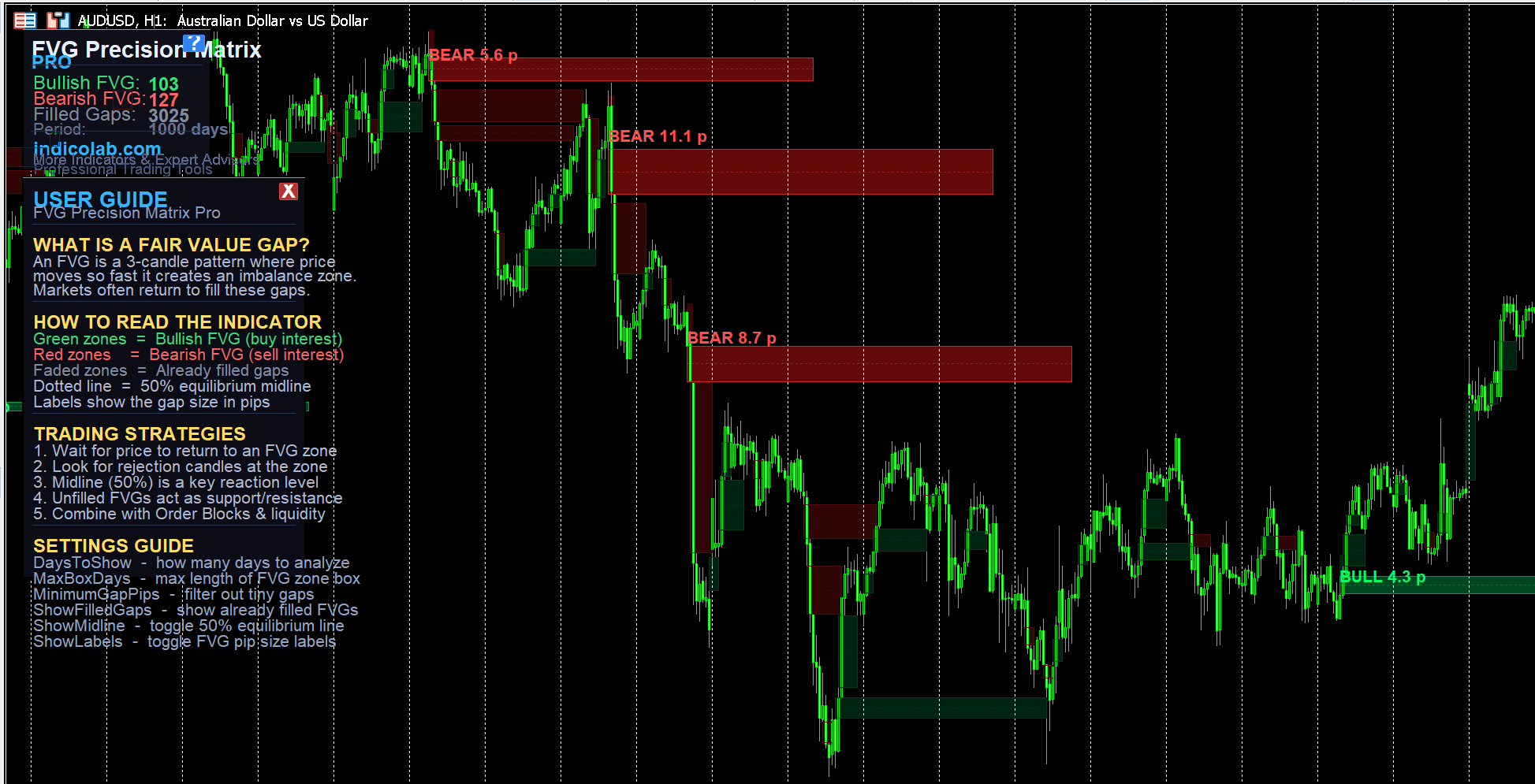
Overview
FVG Precision Matrix Pro automatically detects and visualizes Fair Value Gaps (FVGs) — institutional price imbalance zones where markets tend to return. Built for serious traders who use Smart Money Concepts, ICT methodology, or price action strategies.
The indicator scans your chart, identifies bullish and bearish FVGs using the classic 3-candle pattern, and draws professional color-coded zones with real-time statistics.
Key Highlights
- Automatic Detection — scans up to N days of history (configurable)
- Smart Filled Gap Tracking — active FVGs shown bright, filled FVGs shown faded
- Contrast Labels — gap size in pips displayed above each zone with dark background badge for perfect readability on any chart
- 50% Equilibrium Midline — dotted midline inside each FVG for precision entries
- Max Box Length Control — limit how far zones extend (default 5 days)
- Built-in User Guide — press the [?] button on the panel for a full trading guide
- Real-Time Stats Panel — shows active bullish, bearish, and filled gap counts
- Professional Branding — clean dark panel with indicolab.com signature
How It Works
The indicator identifies 3-candle Fair Value Gaps:
Bullish FVG: Candle 3 Low > Candle 1 High — price gapped up leaving an imbalance below
Bearish FVG: Candle 3 High < Candle 1 Low — price gapped down leaving an imbalance above
When price returns to fill the gap, the zone is marked as "filled" and displayed in faded colors (or hidden, depending on your settings).
Trading Strategies
- Wait for price to return to an unfilled FVG zone
- Look for rejection candles (pin bars, engulfing) at the zone boundary
- Use the 50% midline as a precision entry level
- Unfilled FVGs act as dynamic support/resistance
- Combine with Order Blocks, liquidity sweeps, and market structure
Settings
| Parameter | Description |
|---|---|
| DaysToShow | Number of days to scan for FVGs |
| MinimumGapPips | Filter out gaps smaller than X pips |
| MaxBoxDays | Maximum visual length of FVG zone boxes |
| ShowFilledGaps | Toggle visibility of already-filled FVGs |
| ShowMidline | Toggle 50% equilibrium dotted line |
| ShowLabels | Toggle pip-size labels above zones |
| Bullish/Bearish colors | Fully customizable zone colors |
| Panel position | Adjustable X/Y coordinates |
How to Install
- Download the
.mq4or.mq5file - Copy to your
MQL4/IndicatorsorMQL5/Indicatorsfolder - Restart MetaTrader or refresh the Navigator panel
- Drag the indicator onto any chart
- Press [?] on the panel for the built-in user guide
Compatibility
- MT4 and MT5 versions included
- Works on all instruments: Forex, Crypto, Metals, Indices
- Works on all timeframes: M1 to MN1
- Lightweight — no lag even with 30+ days of data
Features
- Automatic Fair Value Gap detection on all timeframes Smart color-coded zones: bright = active, faded = filled Contrast label badges with gap size in pips 50% equilibrium midline for precision entries Configurable scan period in days (DaysToShow) Max box length control (MaxBoxDays) Built-in interactive User Guide (press ? button) Real-time statistics panel: bullish, bearish, filled counts Fully customizable colors, styles, and panel position Works on Forex, Crypto, Metals, Indices — MT4 & MT5