MARKET PROFILE PRO
Overview
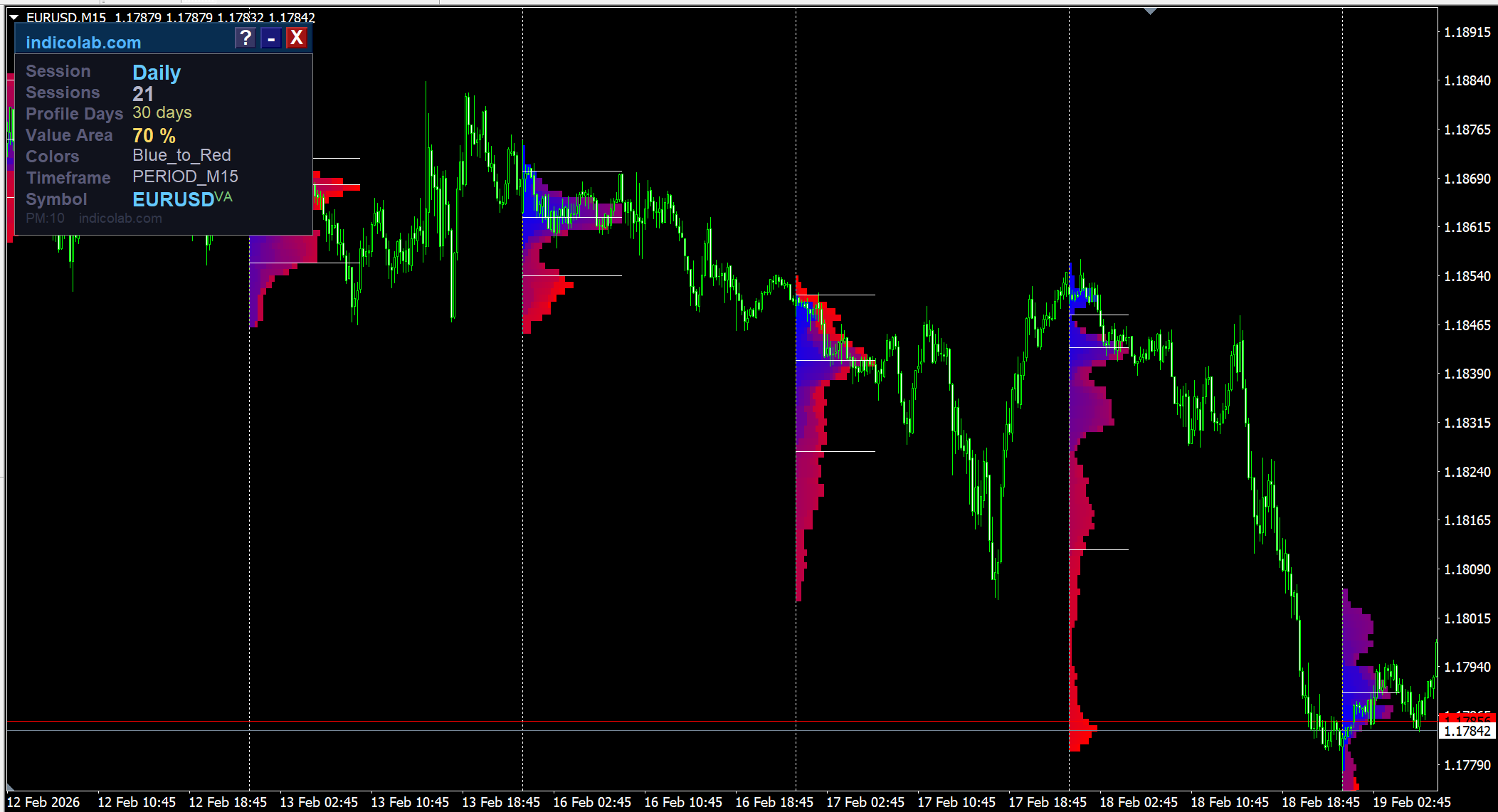
Market Profile Pro displays the Market Profile (TPO chart) directly on your trading chart. It reveals where price spent the most time, helping you identify key support/resistance levels, fair value zones, and potential breakout areas.
The indicator calculates Point of Control (POC), Value Area High (VAH), Value Area Low (VAL), and the full TPO histogram for each trading session.
How It Works
Market Profile organizes price data by time rather than sequence. Each time period that price visits a specific level creates a TPO block. The resulting histogram shows:
- POC — the price level with the most TPOs. This is the "fair price" where the market found the most agreement
- Value Area — the range containing 70% of all TPOs, representing the zone of primary trading activity
- VAH / VAL — upper and lower boundaries of the Value Area, acting as dynamic support and resistance
Session Types
- Daily — one profile per trading day (best on M5–M30)
- Weekly — one profile per week (best on M30–H4)
- Monthly — one profile per month (best on H1–D1)
- Intraday — up to 4 custom sub-sessions per day (best on M1–M15)
- Rectangle — draw a rectangle on chart, profile is calculated inside it
Visual Controls
All visual elements can be toggled on/off independently:
- ShowValueAreaBox — horizontal VAH/VAL boundary lines (on by default)
- ShowMedianLine — POC horizontal line across the profile
- ShowKeyValues — numeric price labels on chart
- Developing POC — watch the POC evolve in real-time
- Developing VAH/VAL — see Value Area boundaries shift during the session
- Single Print detection — marks price levels visited only once
- 6 color gradient schemes + single color option + bull/bear coloring
Interactive Panel
- Draggable info panel with session summary and current settings
- Built-in Help guide — press ? for explanations of all Market Profile concepts
- Minimize/Close buttons for a clean chart view
- ProfileDays parameter to control how many days of history to display
Alerts
- Price Break — when price breaks through POC or VA levels
- Candle Close — when a candle closes above/below key levels
- Gap Cross — when price gaps through key levels
- Popup, Email, and Push notification support
Parameters
| Parameter | Default | Description |
|---|---|---|
| Session | Daily | Profile session type |
| SessionsToCount | 2 | Number of sessions to display |
| ProfileDays | 30 | Limit history to N days (0 = unlimited) |
| ValueAreaPercentage | 70 | % of TPOs inside Value Area |
| ColorScheme | Blue_to_Red | Color gradient for TPO histogram |
| ShowValueAreaBox | true | Draw VAH/VAL horizontal lines |
| ShowMedianLine | true | Draw POC horizontal line |
| ShowKeyValues | false | Display price labels on chart |
| PointMultiplier | 0 | Price resolution (0 = auto) |
How to Trade with Market Profile
Trend Days: Profile is elongated with POC at top or bottom — strong directional move.
Range Days: Wide, bell-shaped profile — price rotating around POC. Trade fades at VA extremes.
Key Levels: POC acts as a price magnet. VAH/VAL act as support/resistance when price is outside the Value Area. Single Prints mark fast-move zones with strong S/R potential.
Opening Types: Open inside previous VA = likely range day. Open outside = potential trend day.
Installation
MetaTrader 4: Copy MarketProfile_Pro.mq4 to MQL4/Indicators/ → Restart MT4 → Drag onto chart
MetaTrader 5: Copy MarketProfile_Pro.mq5 to MQL5/Indicators/ → Compile in MetaEditor → Drag onto chart
Features
- POC, Value Area (VAH/VAL), and full TPO histogram
- Daily, Weekly, Monthly, Intraday, and Rectangle sessions
- 6 color gradient schemes + bull/bear coloring
- Developing POC and VAH/VAL lines (real-time evolution)
- Single Print detection for key S/R levels
- ProfileDays — configurable history depth
- Interactive draggable panel with built-in help guide
- Independent toggles for Median, VA box, and price labels
- Price Break, Candle Close, and Gap Cross alerts
- Available for both MT4 and MT5